1. Purpose and scope
The Helper versions Gen1 Officeless Studio assets (VP, SEM, MEM, DM) for CIMB SMART, stores working copies in Firestore (per user × environment), and promotes them toward the next gateway target.
| In scope | Out of scope |
|---|---|
studio-uat2, studio-uat, studio.smart-cimb.comGateways gateway-uat2 / gateway-uat / gateway
|
Officeless Gen2 (studio.mekari.com)Gen2 wrapper-workflow execute APIs |
2. Architecture overview
Three layers cooperate: the Studio browser tab (session token), the Chrome extension (UI + detection), and the Helper backend (Google session, Firestore, gateway calls).
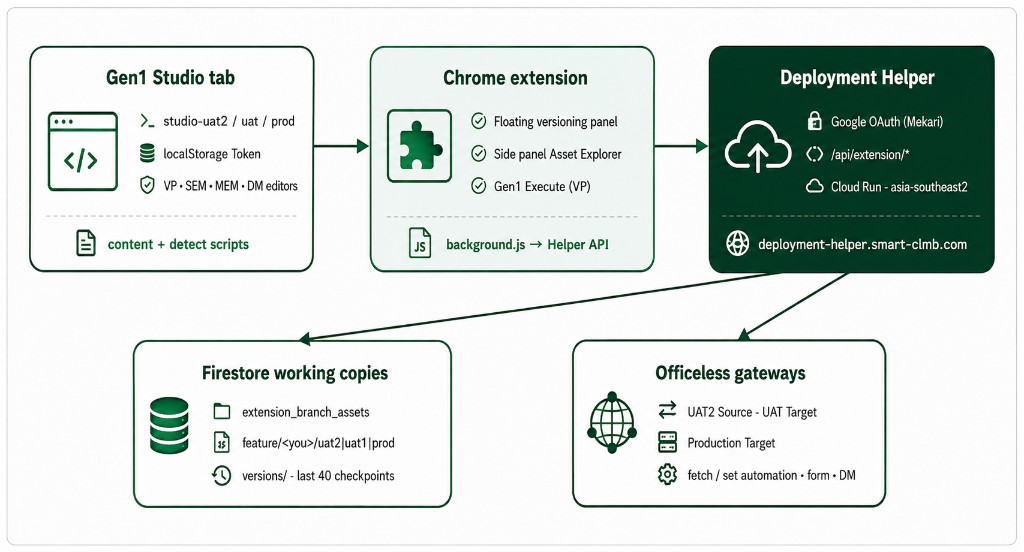
Figure 1. End-to-end architecture — Studio tab, extension, Helper API, Firestore, and gateways.
2.1 Runtime components
| Component | Role |
|---|---|
detect.js |
Detect asset kind/id from URL, DOM, and network; read Studio Token |
content.js |
Floating panel: Sync, Promote, Rollback, Target status, settings |
sidepanel.* |
Gen1 Asset Explorer catalog (VP / SEM / MEM / DM) |
productivity-execute.js |
Gen1 VP Execute against api / webhook triggers |
background.js |
Google sign-in, Helper API proxy, Studio Open (soft hash nav) |
Helper /api/extension/* |
download-commit, promote, rollback, history, preflight, health |
3. Authentication (two layers)
Versioning needs both sessions. Missing either layer causes “unauthorized” or empty catalogs.
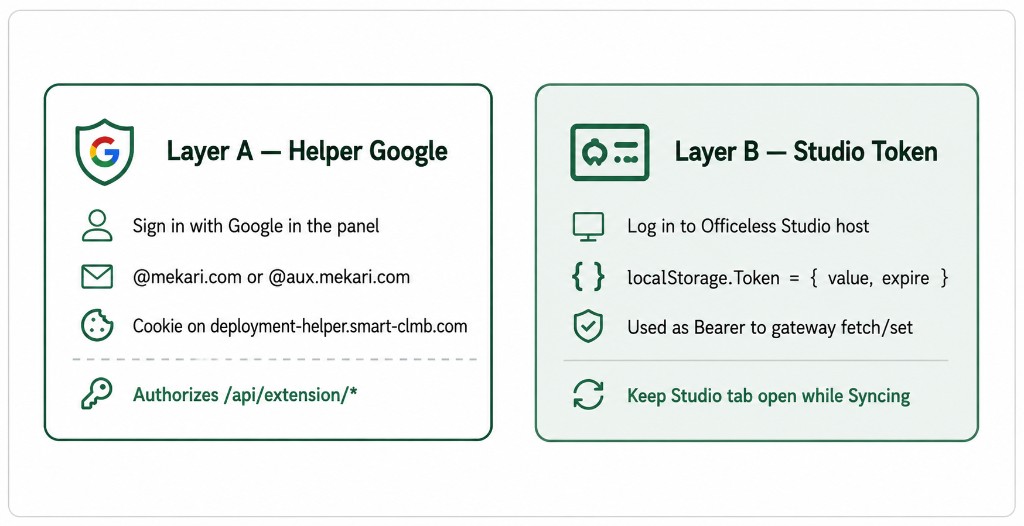
Figure 2. Dual authentication — Helper Google session and live Studio bearer token.
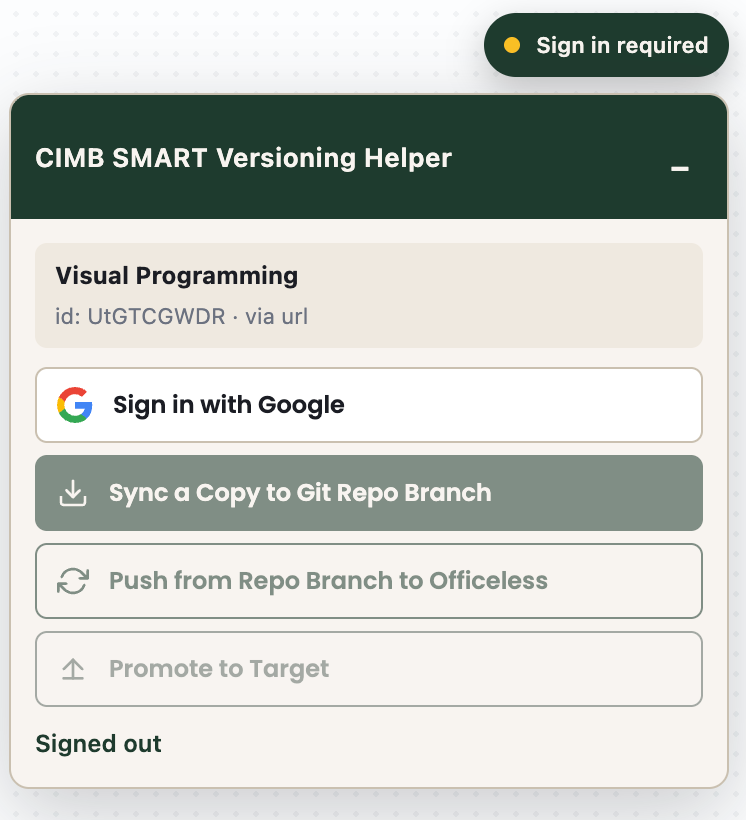
Figure 3. Panel when Helper session is missing — Sign in with Google.
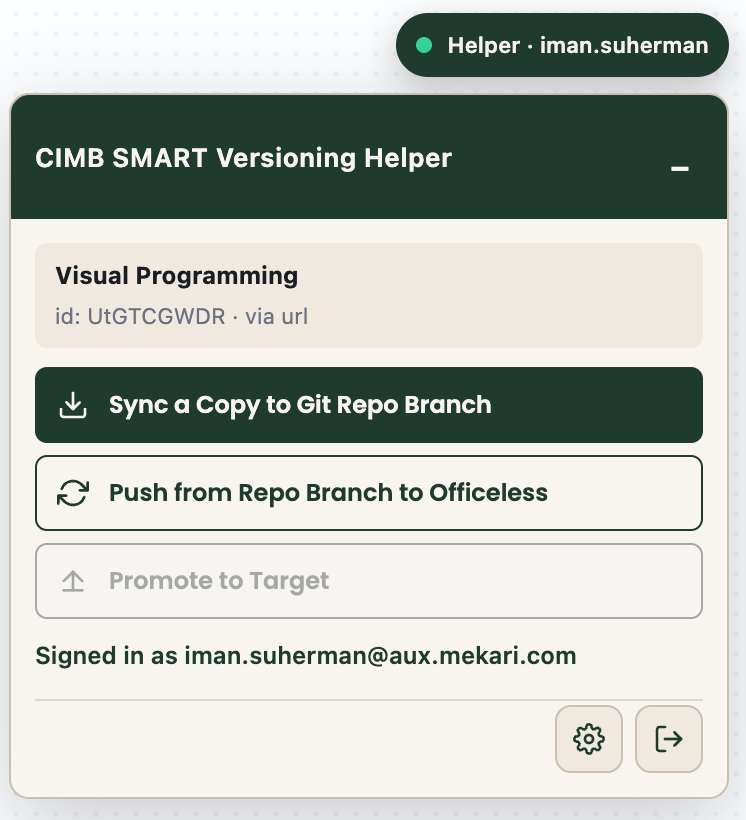
Figure 4. Helper signed in (badge shows Helper · user). Studio Token is still required separately.
4. Per-environment Firestore storage
Sync and Rollback histories are isolated per Studio host so UAT2 / UAT / PROD do not overwrite each other.
| Studio host | Storage env | Firestore branch | Promote target |
|---|---|---|---|
studio-uat2.smart-cimb.com |
uat2 |
feature/<you>/uat2 |
UAT (Golden State) |
studio-uat.smart-cimb.com |
uat1 |
feature/<you>/uat1 |
Production |
studio.smart-cimb.com |
prod |
feature/<you>/prod |
Promote disabled |
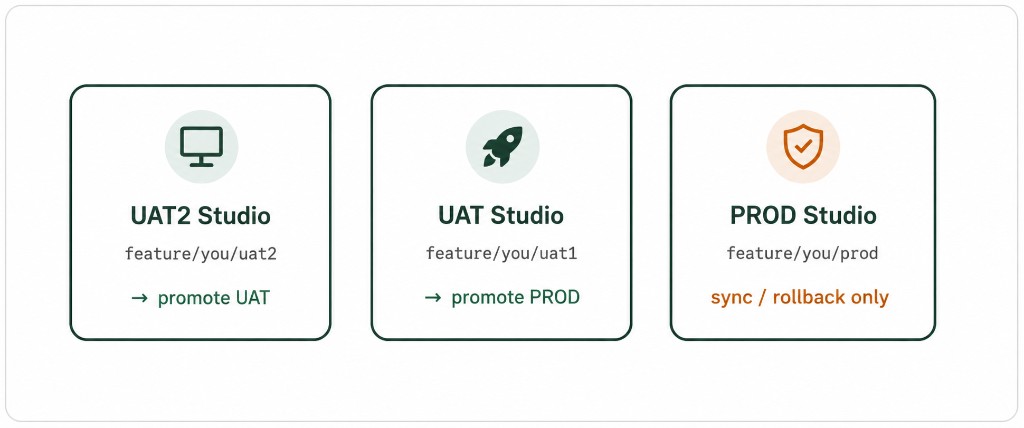
Figure 5. Isolated Firestore branches per Studio environment.
5. Process flows
5.1 Happy path (UAT2 → UAT → PROD)
- Open asset on studio-uat2 → Sync a Copy (Firestore
…/uat2). - Promote to Target → UAT Golden State (preflight: UAT health + Studio UAT sign-in).
- On studio-uat, Sync again if you edit there (
…/uat1branch). - Promote to Target → Production (requires PROD Target settings + Studio PROD session).
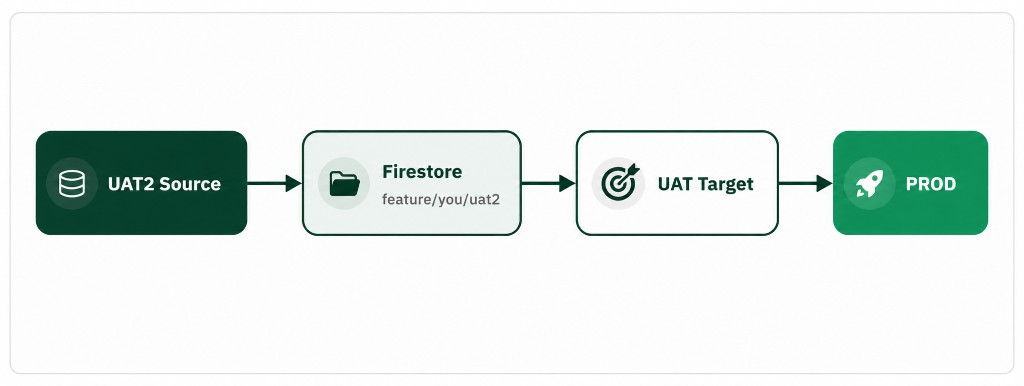
Figure 6. Promote ladder — UAT2 Source → Firestore → UAT Target → Production.
6. Sequences
6.1 Sync a Copy
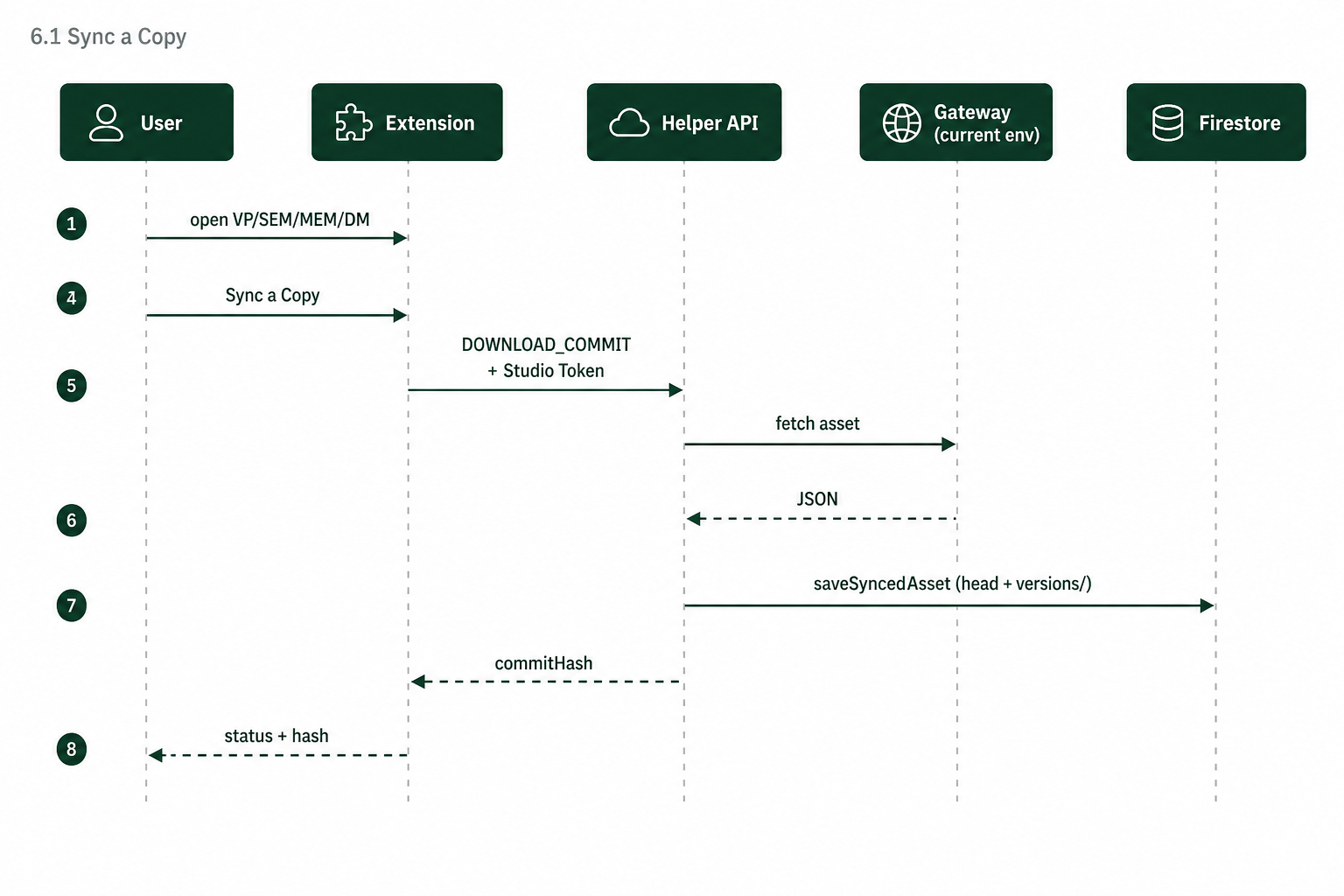
Figure 7. Sync a Copy — download from current gateway and save to Firestore.
6.2 Promote to Target (with preflight)
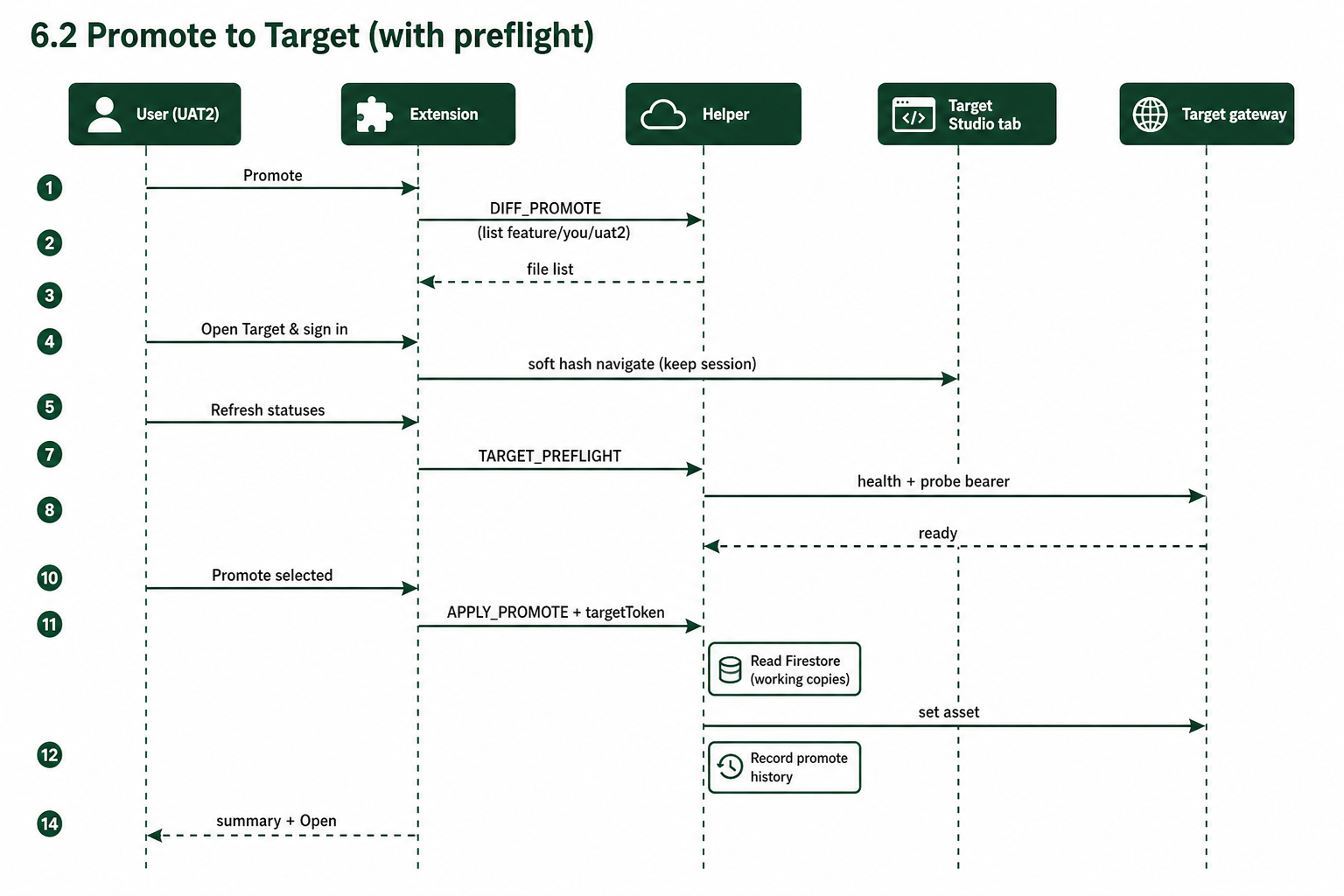
Figure 8. Promote to Target — diff, preflight, then apply with Target token.
6.3 Rollback from Checkpoint
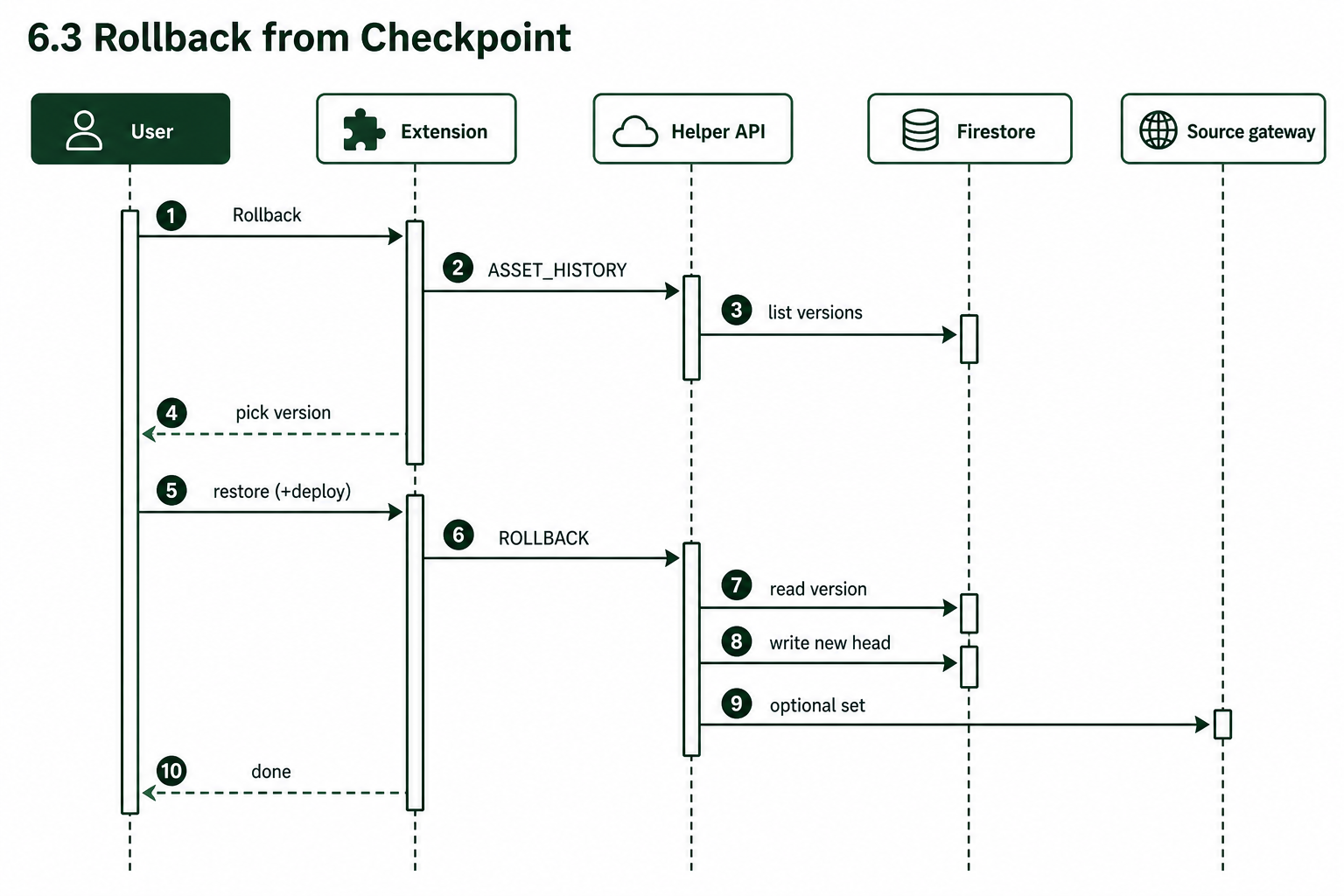
Figure 9. Rollback from Checkpoint — restore a prior Firestore version (optional redeploy).
7. Installation
- Open the install page: deployment-helper.smart-cimb.com/docs/studio-chrome-extension/
- Download
officeless-deployment-helper-extension.zip(current pack v1.4.33). - Unzip. In Chrome open
chrome://extensions, enable Developer mode. - Click Load unpacked and select the unzipped folder.
- Pin the extension. Managed Chrome may use signed CRX via
https://deployment-helper.smart-cimb.com/extensions/update.xml.
| Method | When | Notes |
|---|---|---|
| Load unpacked (ZIP) | Developers / first install | Reload after updates |
| CRX / update.xml | Managed Chrome | Extension id lkpkpbcofjaokmbkkpiaecnegldljeap |
8. Step-by-step usage
8.1 Sign in (Helper)
- Open an editor on Studio (example: Visual Programming).
- In the floating panel, click Sign in with Google.
- Use a Mekari account (
@mekari.com/@aux.mekari.com). - Confirm the badge shows
Helper · <you>.
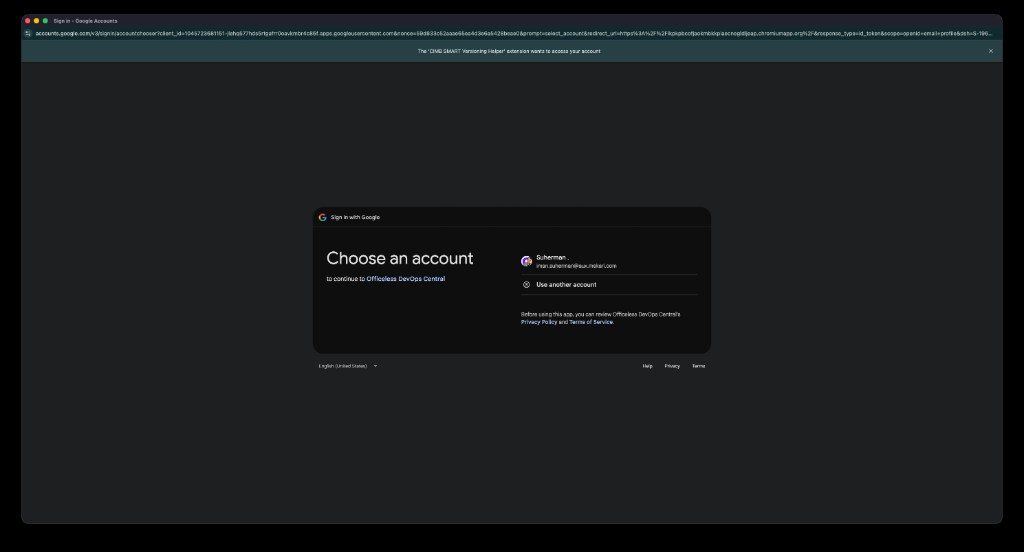
Figure 10. Google sign-in for the Deployment Helper session.
8.2 Configure Target (gear)
- Click the gear icon in the panel footer.
- On UAT2: enter UAT Staging gateway (
gateway-uat.smart-cimb.com) credentials. - On UAT: enter Production gateway (
gateway.smart-cimb.com) credentials. - Use Test connection, then Save Target settings.
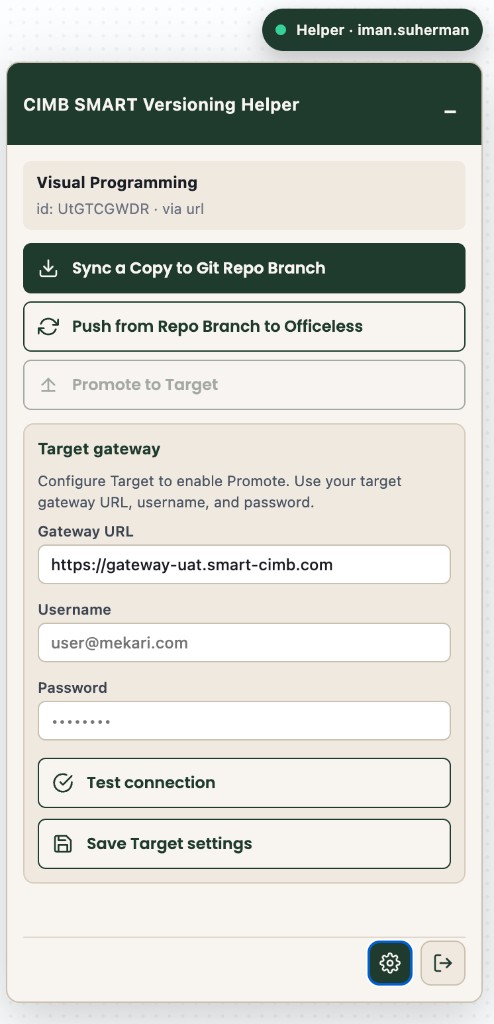
Figure 11. Target gateway settings (gear). Required before Promote.
8.3 Sync a Copy
- Stay logged into the current Studio host (Token present).
- Open the asset editor (VP / SEM / MEM / DM table).
- Click Sync a Copy.
- Confirm status shows a short hash / version id for your env branch.
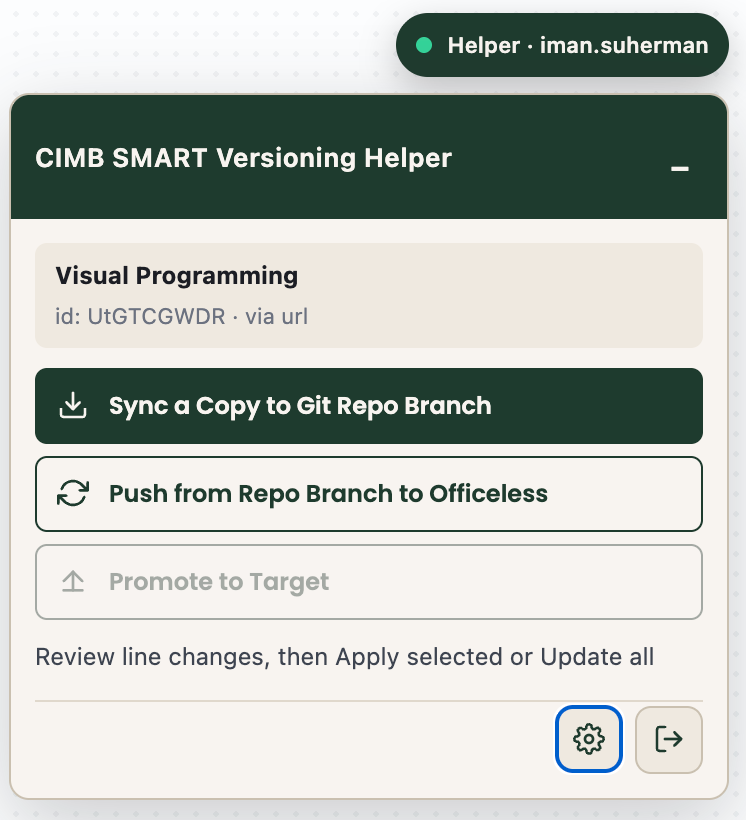
Figure 12. Versioning actions on a detected Visual Programming asset.
8.4 Promote to Target
- Click Promote to Target.
- Review preflight cards: Target health and sign-in.
- If needed, Open Target & sign in (keep that Studio tab open).
- Click Refresh statuses until both cards are green.
- Select synced files → Promote selected.
- Use summary Open / Rollback, or Target status anytime.
8.5 Rollback from Checkpoint
- Open the same asset on the same Studio environment you synced from.
- Click Rollback from Checkpoint.
- Pick a prior version from history.
- Optionally redeploy the restored JSON to Source.
8.6 Target status
- Click Target status.
- Tabs: On Target, Synced (promote), Recent batches.
- Open jumps to the Target editor for that kind/id.
- Rollback selected Target snapshots when available.
9. Gen1 Asset Explorer
Open from the panel (Open Gen1 asset explorer) or the extension side panel. Catalogs load via Helper APIs using your Studio Token from an open Studio tab.
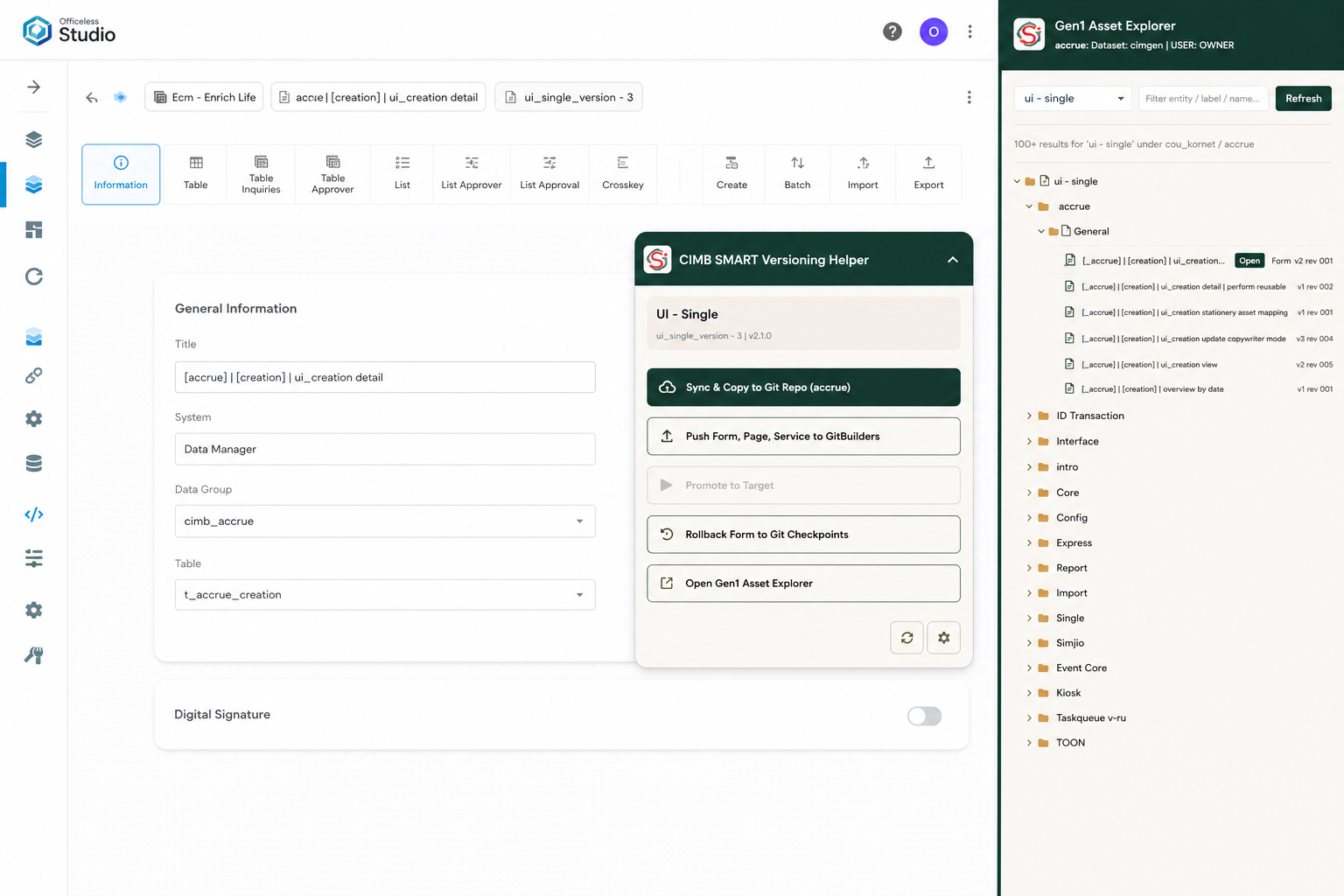
Figure 13. Explorer — UI Single (SEM) catalog.
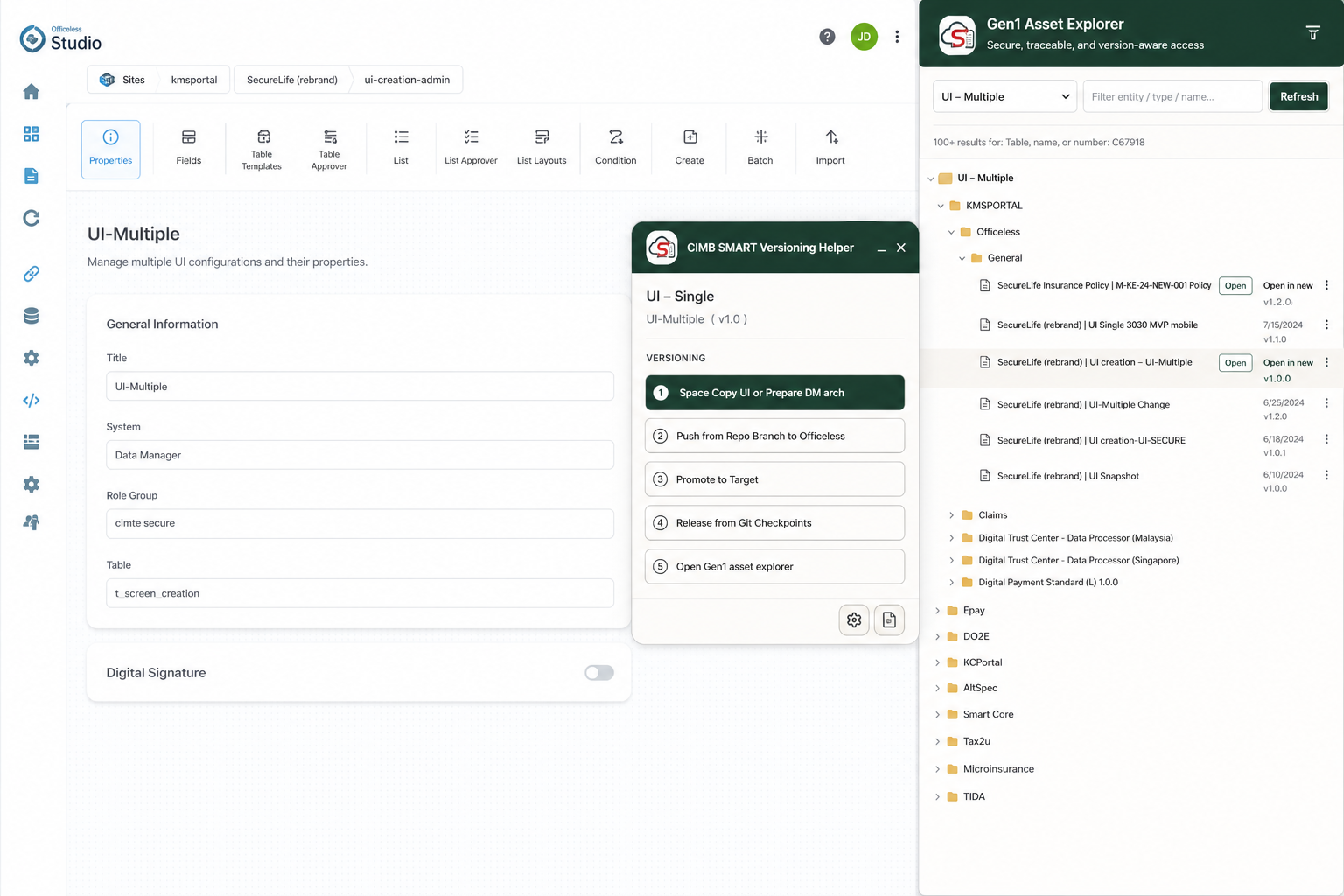
Figure 14. Explorer — UI Multiple (MEM) catalog.
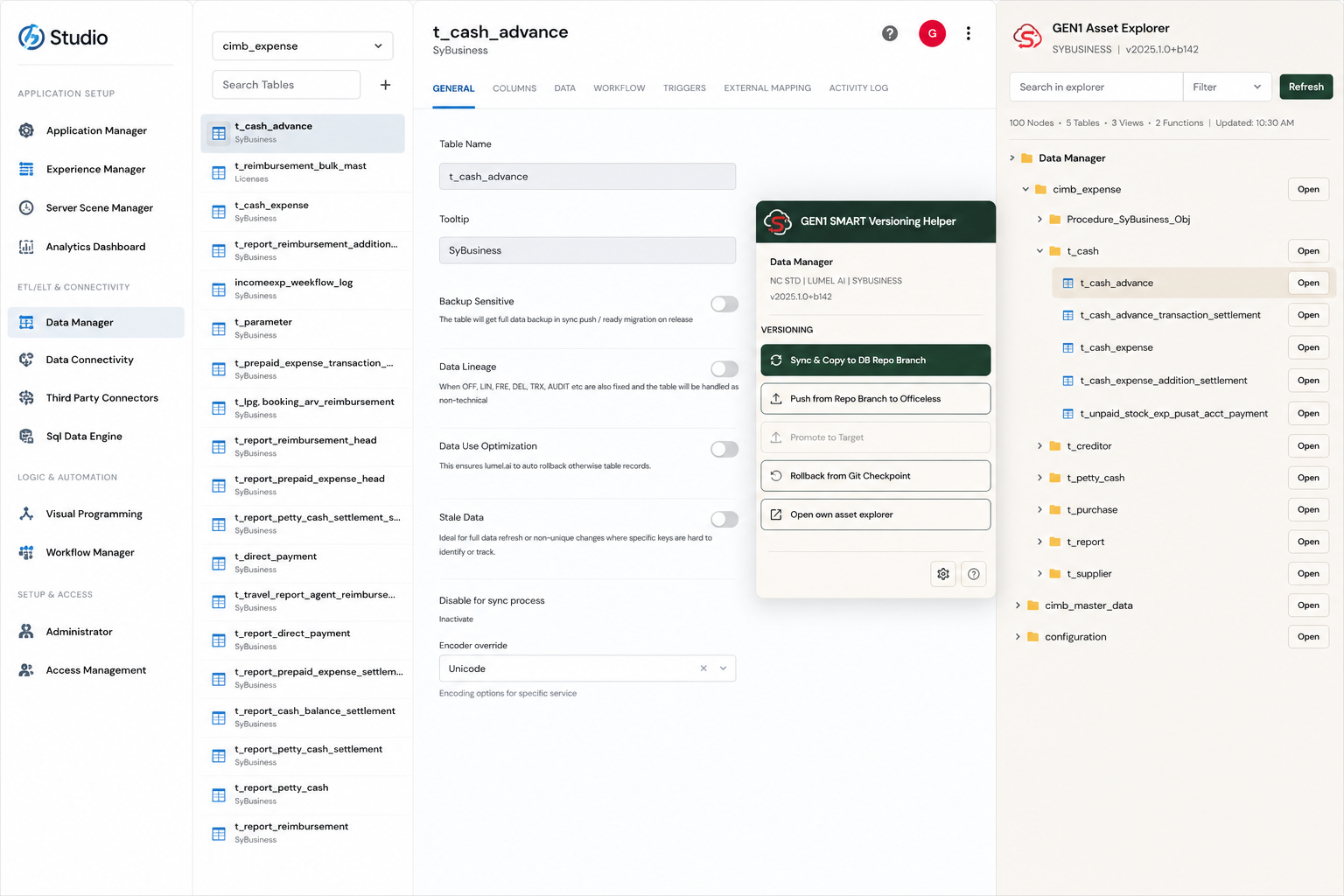
Figure 15. Explorer — Data Manager tables / groups.
10. Gen1 Execute (VP)
On Visual Programming editors, the Gen1 Execute section can fire the workflow’s
api / webhook trigger against the Gen1 gateway using the Studio Token.
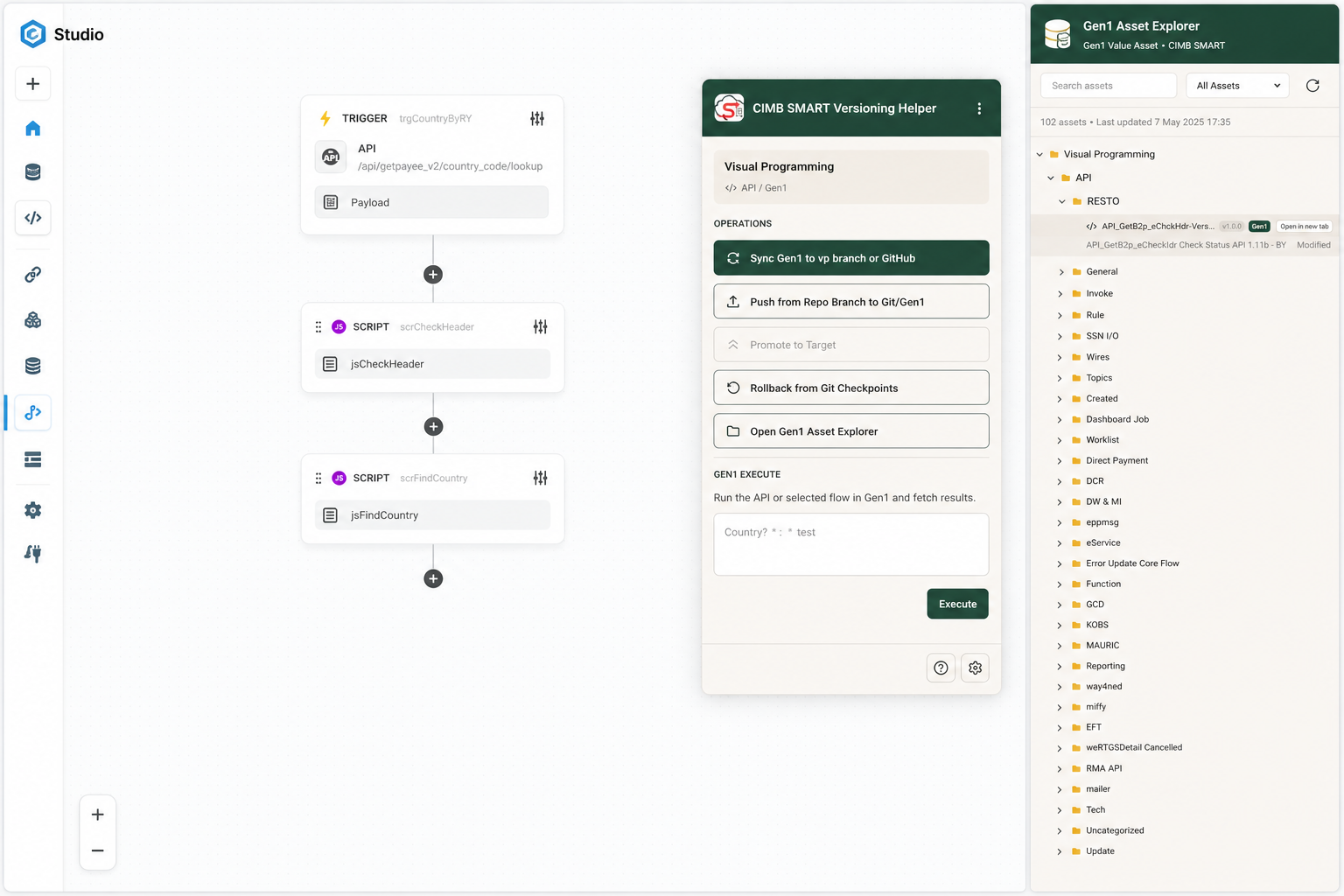
Figure 16. Gen1 Execute on a Visual Programming asset.
studio.mekari.com.
11. Troubleshooting
| Symptom | Likely cause | Fix |
|---|---|---|
| Sign in required / Helper offline | No Google Helper session | Sign in with Google; allow cookies for deployment-helper |
| Studio Token missing | Not logged into Studio host | Log into studio-uat2 / uat / prod; keep tab open |
| Promote 401 unauthorized | Target bearer rejected | Open Target Studio, sign in, Refresh statuses, then promote |
Open lands on #/ or login |
Full reload wiped SPA session | Use extension ≥ 1.4.33; keep Target signed in; Open uses soft hash |
| Empty Sync list on UAT | Copies live on UAT2 branch only | Re-Sync on that environment (per-env Firestore branches) |
| Promote disabled on PROD Studio | By design | Promote from UAT2→UAT or UAT→PROD only |
Validation checklist
- Helper signed in — email visible; health OK
- Studio
Tokenpresent with futureexpire - Target gateway saved for the current promote ladder
- Extension version ≥ 1.4.33 (check
chrome://extensionsor install page build-info)
CIMB SMART Versioning Helper user manual · Extension v1.4.33 ·
Install page ·
Helper ·
Generated for Gen1 Officeless (*.smart-cimb.com)